
Sagar Club Daily Check-in
Daily check-in rewards you for opening Sagar Club once a day. Seven days in a row complete the streak.
Here’s how it works.
Table of Contents
How to check in
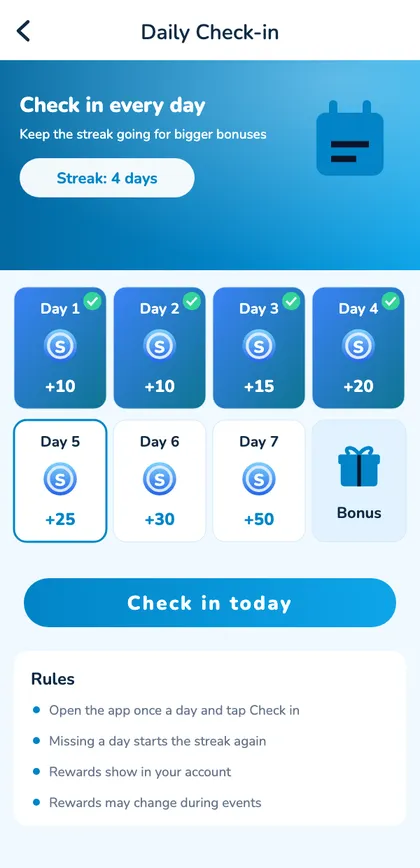
- Log in.
- Open the check-in banner or Events tab.
- Tap Check in today.
- Come back tomorrow.
Rules
| Rule | Detail |
|---|---|
| Once a day | Per account |
| Reset | Midnight India time |
| Missed day | Back to Day 1 |
| Day 7 | Bonus box |
Tips
- Turn on reminders.
- Check in at the same time daily.
- You don’t need to play.
- Rest days are fine – streaks aren’t everything.
A week of check-ins
| Day | Action | Streak |
|---|---|---|
| Mon | Checked in | Day 1 |
| Tue | Checked in | Day 2 |
| Wed | Checked in | Day 3 |
| Thu | Missed | Back to start |
| Fri | Checked in | Day 1 |
| Sat | Checked in | Day 2 |
| Sun | Rest day | Back to start – and that’s fine |
Why check-in exists
It’s a small loyalty feature that rewards regular visits. Use it if it fits your routine – a sixty-second visit to check in and log out is perfectly fine. Don’t let it become a reason to open the app every day when you’d rather not.
Troubleshooting
Button greyed out
You already checked in today.
Streak reset unexpectedly
The day changed at midnight India time.
Page missing
Look in the Events tab.
Check-in when travelling
Resets follow India time. If you’re abroad, midnight IST may fall at an odd local hour – set a reminder if you care about the streak.
Check-in on every device
Check-in belongs to your account, so it works the same in the Android app, on iPhone and in a laptop browser. Checking in once on any device counts for the whole day.
Open Sagar Club the safe way
Use the official app or website. One Sagar Club account works on every device.
Frequently asked questions
When does it reset?
Midnight India time.
Do I need to play?
No.