
How to Register on Sagar Club
Creating a Sagar Club account takes about a minute, but a little preparation makes it go right the first time. This guide covers what you need, each step of the register screen, what to do straight after, and how to fix the problems people run into.
If you already have an account, you’re looking for the Sagar Club login guide instead.
Table of Contents
- What is Sagar Club?
- What you need to register
- How to register on Sagar Club
- How to log in after registering
- What to do after creating your account
- How to fix registration problems
- Choosing the right number
- A registration, start to finish
- Privacy at sign-up
- Registering on a laptop
- Register on the app or the website?
- FAQs
What is Sagar Club?
Sagar Club is a mobile game app launched in October 2026. One account gives you access to timed lottery-style games such as WinGo, K3 and 5D, the crash game Aviator, slots, card tables and quick mini games. You can use it through the Android app, the iPhone home-screen app or any browser.
What you need to register
| Item | Details |
|---|---|
| Mobile number | An Indian number that receives SMS |
| Password | At least 8 characters, not used elsewhere |
| Invite code | Optional |
| Age | 18 or older |
| Time | About a minute |
How to register on Sagar Club
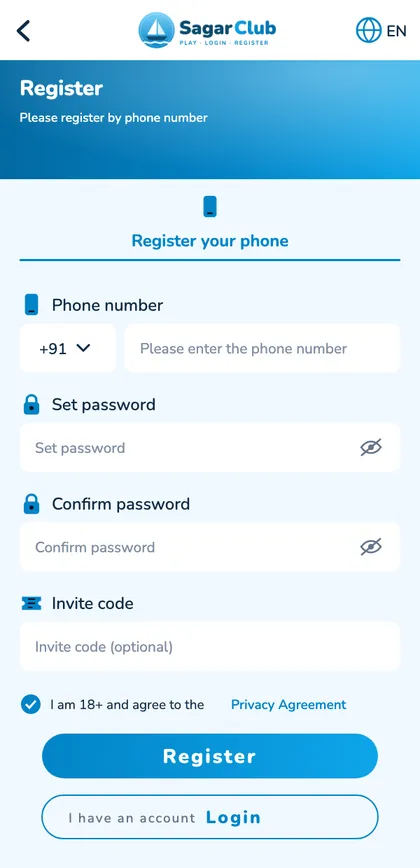
Step 1: Open the official Sagar Club website or app
Use the installed app or a bookmark of the official site. Avoid links from forwards – copies of the register page exist to collect numbers and passwords.
Step 2: Tap the Register button
It’s on the welcome screen next to Log in.
Step 3: Enter your mobile number
Keep +91 in the country box and type exactly ten digits – no leading 0, no spaces. This number becomes your login ID and recovery channel, so choose one you’ll keep.
Step 4: Create a strong password
Type a password of at least eight characters, then type it again in Confirm password. Three unrelated words plus a number is easy to remember and hard to guess. Type both boxes by hand – pasting can add a hidden space.
Step 5: Enter an invite code (optional)
If a friend shared a link, their code is filled in. Otherwise leave it blank. See invite code.
Step 6: Accept the terms
Tick the box confirming you’re 18+ and agree to the privacy agreement. The Register button won’t work until it’s ticked.
Step 7: Enter the verification code
A 6-digit SMS code arrives within seconds. Type it (or let your phone paste it). Wait for the full timer before tapping Resend.
Step 8: Complete registration
You’ll land in the lobby with a new account number – your UID.
How to log in after registering
Next time, tap Log in, enter your number and password. No SMS code is needed for a normal login. Full help: Sagar Club login.
What to do after creating your account
Complete your profile
Change the default nickname to something that isn’t your real name.
Set up account security
Bind an email, turn on login alerts and note your UID – see account security.
Review the games
Open the lobby and look through the tabs before playing anything.
Check the rules before playing
Every room has a How to play page – read it once. Start with WinGo in the 3-minute room.
How to fix registration problems
Registration page won’t open
Switch Wi-Fi/mobile data, turn off VPN, update your browser or the app.
OTP isn’t received
Check the number, spam folder, DND and SIM settings – full list: OTP not received.
“Number already registered”
You already have an account – log in or reset the password.
“Passwords do not match”
Retype both boxes by hand.
“Invalid invite code”
Clear the box and continue without it.
Choosing the right number
Most people register with whatever SIM is in the phone at that moment. It’s worth pausing, because this number becomes your login ID and the only place password-reset codes are sent. A number you’ll still have next year is ideal. Office SIMs, a relative’s number or a short-term travel SIM all cause problems later.
| Number | Verdict |
|---|---|
| Your main personal SIM | Best choice |
| Second SIM that always receives SMS | Fine |
| Work SIM | Avoid – you may lose it |
| Family member’s number | Never |
| Temporary SIM | Never |
A registration, start to finish
Imagine Neha registering for the first time. She opens the official site from a bookmark her friend helped her make. She taps Register, types her ten-digit number and checks it twice. For the password she picks three things she can picture – a yellow kite over a lake – and types yellow-kite-lake-27 into both boxes, checking each with the eye icon. Her friend’s invite code is already filled from the link. She ticks the 18+ box and taps Register. Eight seconds later the SMS arrives and her phone offers to paste it. She’s in the lobby. Before touching any game, she opens Account, writes down her UID, binds her email and turns on login alerts. Four minutes total, and her account is set up to be easy to recover.
Privacy at sign-up
Registration only needs a mobile number and a password. You’re never asked for Aadhaar, PAN, bank details or a photo to create an account. If any page or person asks for those ‘to verify’ your registration, treat it as a scam.
Registering on a laptop
The steps are identical in Chrome, Edge, Firefox or Safari. The SMS still goes to your phone, so keep it nearby. Afterwards, the same account works on the app.
“The code arrived but it says incorrect.”
You probably typed an older code. Use only the newest SMS.
“I closed the page before entering the code.”
Start again and request a fresh code after the timer.
“I registered with the wrong number.”
If the code reached you, move the account later from your profile; if it didn’t, register again with the right number.
Register on the app or the website?
Both create exactly the same account. If you haven’t installed anything yet, registering on the official website is perfectly fine; you’ll log in to the app later with the same number and password. If you already have the app, register inside it. Either way, start from a source you trust – a bookmark or the installed app – rather than a link in a message.
Open Sagar Club the safe way
Use the official app or website. One Sagar Club account works on every device.
Frequently asked questions
Is registration free?
Yes.
Can I register without an invite code?
Yes.
Can I register with email only?
No – you register with a mobile number and can bind an email later.
Can I have two accounts?
No – one per person.
How long is the OTP valid?
A few minutes.