
Sagar Club Customer Support
Sagar Club support lives inside the app. Live chat handles login trouble, number changes, locked accounts and game questions.
Here’s how to get a fast answer.
Table of Contents
How to contact support
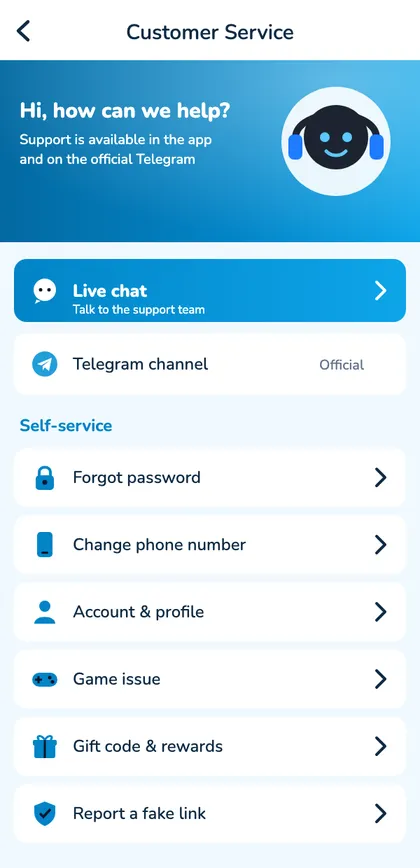
- Open Account → Customer service.
- Choose live chat or a self-service option.
- Describe the problem in two or three sentences.
- Include your UID and a screenshot.
Self-service first
Fake support
Real support never asks for your password or OTP, never asks you to install screen-sharing apps and never messages you first on WhatsApp or Instagram.
A message that gets answered fast
“UID 48219037, number ending 4210. Since 10:30 today I see ‘Too many attempts’ on Android. I waited 30 minutes and tried forgot password, but no SMS arrives. Screenshot attached.” Short, specific and complete – that’s what gets a quick reply.
What support can and can’t do
| Request | Possible? |
|---|---|
| Explain errors | Yes |
| Help with number changes | Yes, after verification |
| Lift security holds | Yes, after checks |
| Tell you your password | No – nobody can see it |
| Change results | No |
When support is busy
After updates or during big events, replies slow down. Check the lobby notice line and the official channel for known issues first – your answer may already be posted.
Self-service, first
| Problem | Try |
|---|---|
| Forgot password | Reset by SMS |
| Code not arriving | OTP fixes |
| Login errors | Login guide |
| Suspicious alert | Security steps |
Open Sagar Club the safe way
Use the official app or website. One Sagar Club account works on every device.
Frequently asked questions
Is support available 24/7?
Live chat runs through the day; replies may be slower late at night.
Will support ask for my OTP?
Never.