
Sagar Club Invite Code
The invite code is the last field on the Sagar Club register screen. It links a new account to the friend who invited them – and it’s completely optional.
Here’s everything about it, in one place.
Table of Contents
Do you need an invite code?
No. You can register on Sagar Club without any code. If a friend sent you their invite link, the code fills in automatically; otherwise leave the box empty. Your account, games and login are exactly the same either way.
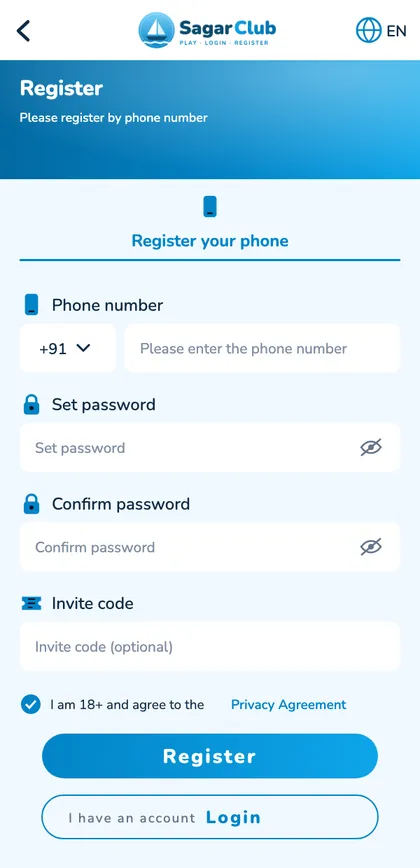
What the invite code does
- Links your new account to the person who invited you.
- Adds you to their friends list.
- Can only be added at registration – not later.
- Doesn’t change your games, password or login.
Where to find your own invite code
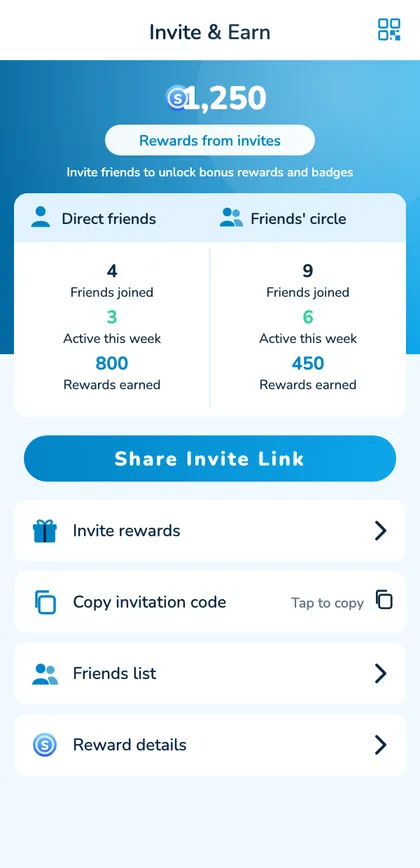
- Log in to Sagar Club.
- Open the Invite page.
- Tap Copy invitation code or Share Invite Link.
Invite code problems
“Invalid invite code”
Clear the box and register without it, or copy the code again.
Forgot to add it
It can’t be added after registration.
Code filled automatically
You opened a friend’s link – keep it or clear it.
Sharing your invite safely
- Share only with adults who want to join.
- Don’t spam groups.
- Never ask for a friend’s OTP or password.
- Point them to the register guide.
Open Sagar Club the safe way
Use the official app or website. One Sagar Club account works on every device.
Frequently asked questions
Is an invite code required for Sagar Club?
No.
Can I change my invite code?
No – it’s fixed to your account.
Can I add a code after registering?
No.